tl;dr: Caches are an important tool in Drupal to keep page loads as efficient as possible, without risking showing old inaccurate information.
Proper caching in Drupal development can be easily missed. This can result in problems in a few ways:
- If caches don't clear often enough, the page will show outdated information.
- If caches clear too often, that's extra page load time and extra processing needed for the server every time.
- If cache contexts are not well defined, something that is correct for one context will get displayed in a different context.
Here are the big concepts as well as some examples.
Contexts
The first big concept is the idea of a context. Contexts define what situations should be considered unique for a cache. A context may be one thing, or a combination of several things, including:
Theme Context
If there's nothing variable about the template you wish to cache except which theme it is used in, you can use the context of theme. This would be highly efficient, since it almost never needs to regenerate from scratch, just when you manually clear all caches or you change the theme. In my setting, an example is custom footer blocks. It's the same content on every page. It only needs to change if there was a theme change or a new deployment (which always includes clearing all caches anyway).
That's the simplest possible version of a cache context.
User Context
The content of the section may change based on which user, if it is something like a block that shows the current user's event registration history. In that case, you will need to set the context by individual user. That means it is going to be a little slower for the first time each user loads it. After that, though, it will be much faster, so it still has some big benefit compared to not caching at all.
The content may also change based on the role of the user. Perhaps admins have an extra link that others don't, so you need to separate that so for authenticated users it looks like one thing and for admin users it looks like another thing, but there's no difference per user. The cache context makes sure that the wrong one isn't displayed to a user of the wrong role. It is also more efficient than setting the context per user, since there are likely going to be a lot less roles than there are users at least on large sites.
Page Context
Perhaps the content changes based on which page it is tied to. This may be something like view results that change based on the exposed filters parameters, or a block showing in the sidebar that shows more information about the node you're viewing. With this cache context, you can declare that it doesn't need to rebuild for every user coming to that page, saving a lot of load time, but you also do need to make sure it is clear that on this page the block builds differently than on another page or else you're showing the wrong information.
Tags
The next big concept is tags. Tags can be used to define under what conditions the cache should be rebuilt.
There are many default tags that are provided by Drupal core or by other modules. For example, the default node_list tag is for any time there is a change in any nodes on the site. If you have a view that is showing all nodes on it, that is a great tag to clear anytime that you want the view to update.
Remember the trade-off in efficiency, though. If you have a site with a lot of nodes being edited regularly, that's going to clear the cache for that view a lot. For this example of a view showing all nodes, you won't get much better than that. Depending on the need, though, you might be able to get more precise: does it only need to rebuild caches on changes to certain content types, or to a specific node? If so, you can change the cache tags to something more precise that won't need to wipe out that cache more than necessary. The question is: what are the scenarios where the cache needs to clear, and how can you achieve that without too much unnecessary clearing as well?
Note the two sides to that equation. You need to clarify that this block or template or view or whatever else uses a certain tag. Then you need the other scenarios to declare when it is time to clear that tag and thus rebuild everything depending on it. In many cases, one or both of those sides of the equation is already provided by Drupal core or other modules that you are building on top of and you only need to finish the job, but you do need to understand how both sides are working.
Max Age
Finally, the max age defines a maximum amount of time in seconds before the cache will need to rebuild.
This also includes an option to be set to PERMANENT, or -1, which means the cache will stay until manually cleared or cleared by tag. If it can be clearly defined as only ever being associated with a tag being invalidated, it's highly efficient to set the max age to permanent and let the tags do all the work.
You can also set the max age to 0, meaning it is never cached. This isn't ideal performance usually, but if it is something that needs to represent frequent changes and those causes of the changes are too complicated to easily put into tags, it may be a better option than trying to building a lot of custom code you need to maintain just to handle a tiny efficiency improvement.
Example: Custom Sidebar Block
I wanted custom blocks to show content related to the current node being displayed, in order to show that data in a sidebar block.
In this case, I needed to combine a few things:
- Set the context to url, in order to clarify that each URL should have its own caches version, not the same cached version across other pages.
- Set the tag for the one specific node that impacts it.
- Set the max age to permanent.
Combined, this is saying that the cache for the block will clear if and only if the node is updated and the contents of that block will vary by page. That's exactly the optimal performance scenario, with no chance of showing bad information and no unnecessary cache clearing slowing things down.
There's one more complication, though: what if the block is empty? That's a little different. When the block is empty, it actually needs to not cache at all, i.e. set the max-age to 0. Otherwise, it will be fine when changing from having content to not having content, but it won't update properly when going from empty to not empty.
Here's some of how that works in code, as a build function of a custom block. In this example, the content has a field field_accessibility which should show up styled nicely in a sidebar if one if provided.
use Drupal\Core\Block\BlockBase;
use Drupal\Core\Cache\Cache;
use Drupal\Core\Field\FieldItemList;
use Drupal\Core\Plugin\ContainerFactoryPluginInterface;
use Drupal\Core\Routing\RouteMatchInterface;
use Drupal\node\NodeInterface;
use Symfony\Component\DependencyInjection\ContainerInterface;

class AccessibilityBlock extends BlockBase implements ContainerFactoryPluginInterface {
  /**
   * Service for getting current node ID.
   *
   * @var \Drupal\Core\Routing\RouteMatchInterface
   */
  protected RouteMatchInterface $currentRouteMatch;

  /**
   * Constructs a new SearchBlock object.
   *
   * @param array $configuration
   *   The block configuration.
   * @param string $plugin_id
   *   The plugin ID for the block.
   * @param mixed $plugin_definition
   *   The plugin definition for the block.
   * @param \Drupal\Core\Routing\RouteMatchInterface $currentRouteMatch
   *   The current route service.
   */
  public function __construct(array $configuration, $plugin_id, $plugin_definition, RouteMatchInterface $currentRouteMatch) {
    parent::__construct($configuration, $plugin_id, $plugin_definition);
    $this->currentRouteMatch = $currentRouteMatch;
  }

  /**
   * {@inheritdoc}
   */
  public function build(): array {
    $markup = '';

    $cacheability = [];
    $cacheability['contexts'] = ['url.path', 'url.query_args'];
    $cacheability['tags'] = [];
    $cacheability['max-age'] = 0;

    $node = $this->currentRouteMatch->getParameter('node');

    if ($node instanceof NodeInterface) {
      $cacheability['tags'] = Cache::mergeTags($cacheability['tags'], $node->getCacheTags());

      if ($node->hasField('field_accessibility') && !$node->get('field_accessibility')->isEmpty()) {
        $field_accessibility = $node->get('field_accessibility');
        if ($field_accessibility instanceof FieldItemList) {
          foreach ($field_accessibility as $accessibility) {
            $markup .= '<p class="button">';
            $title = $accessibility->get('title')->getString();
            $url = $accessibility->get('uri')->getString();
            $markup .= "<a href=\"$url\">$title</a>";
            $markup .= "</p>";
          }
          // If content is present, this block can be cached for a long time,
          // relying on the tags to invalidate it when the node changes.
          $cacheability['max-age'] = Cache::PERMANENT;
        }
      }
    }

    return [
      '#markup' => $markup,
      '#cache' => $cacheability,
    ];
  }
}
If there isn't an accessibility statement link, it will have 0 max-age but still be defined by context to make sure it isn't impacting other pages. If there is a link, it will get a permanent cache as well as building the markup to return.
Example: View with Custom Tag Override and Timed Filters
This one is a bit more complicated, but is a common scenario: what do I do for a view like "upcoming events"? I want to show all nodes of type event, but only when they're still in the future.
Tag for Only Events
The first part is a little more obvious: let's narrow down the tags on the view. It only shows content of type event, so it doesn't need to be rebuilding for every change to every type of node, which is the default view setting. This could be done programmatically, but if you're doing a lot of views, it's probably worth installing the views_custom_cache_tag module that helps.
After installing and enabling that module, the Views UI will give a new option in the Caching settings for "Custom Tag based" as opposed to the default "Tag based."
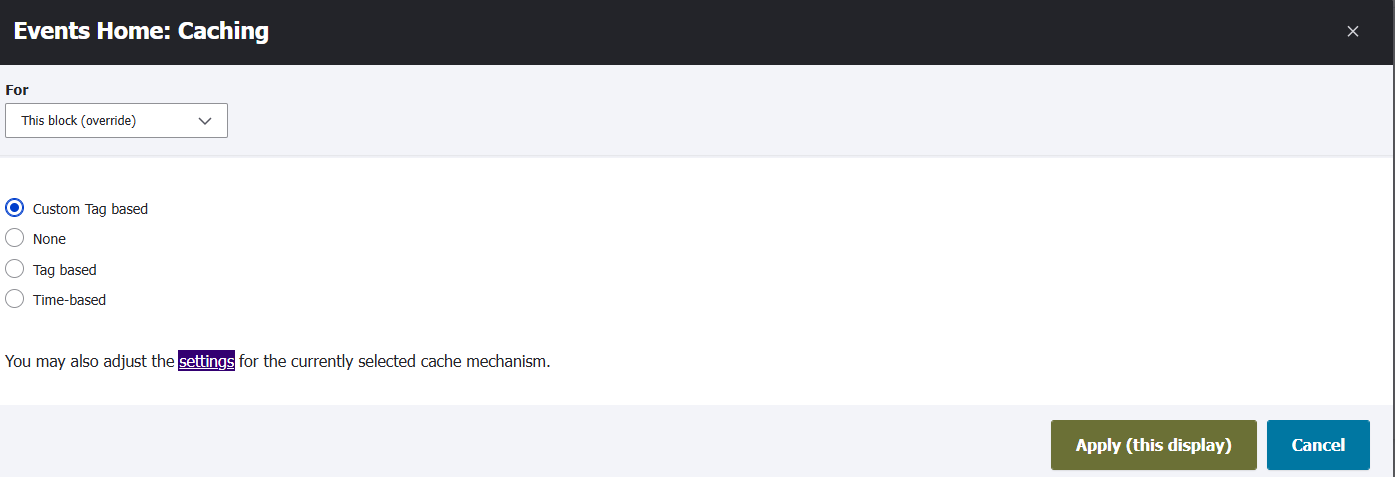
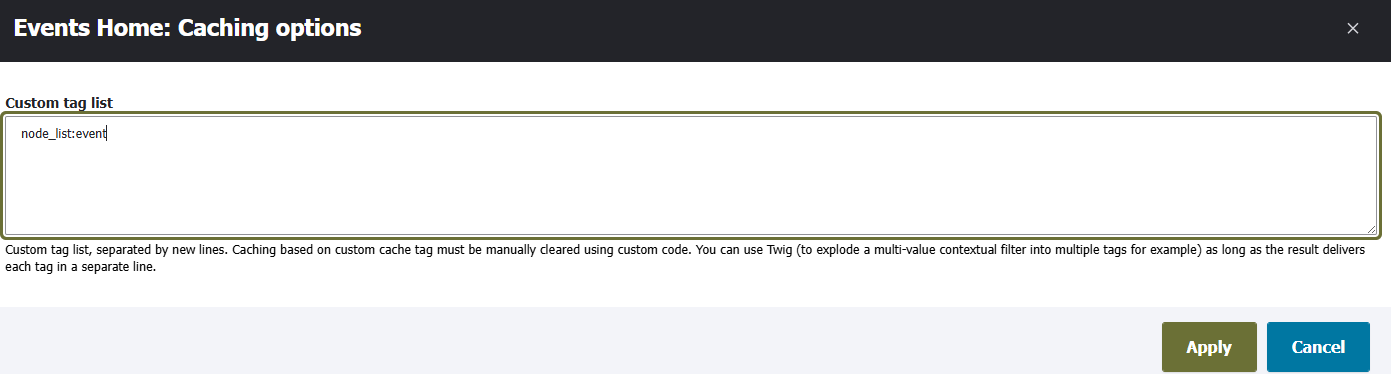
That helps with narrowing down the frequency of caches to only those changes that matter. In this case, I can have a tag only for changes to events, not to changes of all nodes as would be default ,using node_list:event. There are a lot less events than there are total nodes, so this is a big performance improvement with the caches only being cleared a fraction as often.
Max-Age for Timing
A more precise tag doesn't help with another aspect of this view, though: timing. Only upcoming events should be shown. Since the nodes aren't changing at all at the moment that the time is past, you can't rely on tags.
You could use a short max age just to be safe - make it an hour and it will never be more than an hour out of date, not bad in the context of events - but that's not as efficient unless you're updating events a lot anyway. That would be clearing caches a lot when it doesn't need to.
That's when I realized I could be a little more creative about how to generate that max age. Instead of setting it to a specific value, I could write in PHP to use the difference in time between now and when the next event starts. If the view builds now with the next event two hours away, it will set the max-age to the number of seconds between now and that time. When it hits that time, it rebuilds, finding the next upcoming event and setting a max-age based on that instead. This will result in the content never being out of date, not even for a reasonable amount of time like an hour, and also never clears unnecessarily.
To do this, I added this code in my .theme file:
/**
 * Helper to get the timestamp until next event.
 *
 * @return int|null
 *   Time to next event's start.
 */
function _my_theme_get_time_to_next_event(): int|null {
  $now_datetime = new DrupalDateTime('now', new \DateTimeZone('UTC'));
  $now = $now_datetime->format(DateTimeItemInterface::DATETIME_STORAGE_FORMAT);

  // Get the next upcoming event.
  $node_ids = \Drupal::entityQuery('node')
    ->condition('type', 'event')
    ->condition('field_start', $now, '>')
    ->sort('field_start', 'ASC')
    ->range(0, 1)
    ->accessCheck(FALSE)
    ->execute();

  if (!empty($node_ids)) {
    $node = \Drupal::entityTypeManager()->getStorage('node')->load(reset($node_ids));
    if ($node instanceof NodeInterface) {
      $start_date_value = $node->get('field_start')->value;
      if (is_string($start_date_value)) {
        // 60 seconds is a minimum to allow for some buffer in build time.
        return max(60, strtotime($start_date_value) - strtotime($now));
      }
    }
  }
  return NULL;
}

/**
 * Implements hook_views_pre_render().
 *
 * Sets cache max-age on views with nodes
 * that can flip from visible to invisible
 * based on time.
 */
function my_theme_views_pre_render(ViewExecutable $view): void {
  if ($view->id() == 'events') {
    if (in_array($view->current_display, ['block_1', 'block_2'])) {
      // Cache until the next upcoming event starts.
      $view->element['#cache']['max-age'] = _my_theme_get_time_to_next_event() ?? Cache::PERMANENT;
    }
  }
}
Note: since Drupal 11.3, this would be possible to do with the new hook OOP implementation structure instead of being defined like this in the .theme file with a bunch of hooks and preprocessors, but the rest of the logic would be the same.
Previous: Entity Usage Tracking