tl;dr: Sometimes you want to pull an Xhibit meme and put content in your content. There's a module that helps.
The Problem
In my work, I've encountered a couple of scenarios where I wanted to embed some version of one node of content into another node of content.

This has at least a couple significant benefits over copying the same block multiple times into multiple pages:
- If something needs updated on the source node, you don't have to update every other page referencing it separately. Update it once and trust that it is ready everywhere.
- The same style can be enforced consistently so it always looks identical across multiple pages, instead of relying on different content authors to always use the same formatting, or even for the same content author to remember to do the same formatting every time.
The Solution
I was prepared for this to be a custom code project. Then I did some quick research and found the entity_embed module that is almost exactly what I wanted (I'll touch on a couple minor UI things later). This module allows putting a button in the CKEditor for any text format which will then embed that content.
This module is documented and generally works as advertised, but I'll walk through the experience:
Configuration
After the usual steps for a new module of installing and enabling it, go to the configuration screen, which is added to the menu under Administration -> Configuration -> Content authoring -> Embed buttons. There are a few settings under the Settings tab, but those are minimal about where the icons for the buttons get saved.
The "List" tab is where you add your buttons and configure them.

For each button, you get some good options out of the box:
- Admin label
- Embed type
- Entity type (if the embed type was an entity)
- Content type (if the entity type was Content)
- Allowed display plugins
- Allowed alignments
- Whether to display a caption
- Button icon, and an option to reset it
The most interesting one to me is the allowed display plugins. This makes it possible to enforce that you always want those databases, for example, to always appear in the exact same way when embedded on other sites. This meets one of the goals noted above, with a more strongly encouraged consistent formatting.
Add to Text Format
This is the typical process if you've edited a text format before. Under Configuration -> Content authoring -> Text formats and editors, pick the text format you want to add the button to the toolbar.
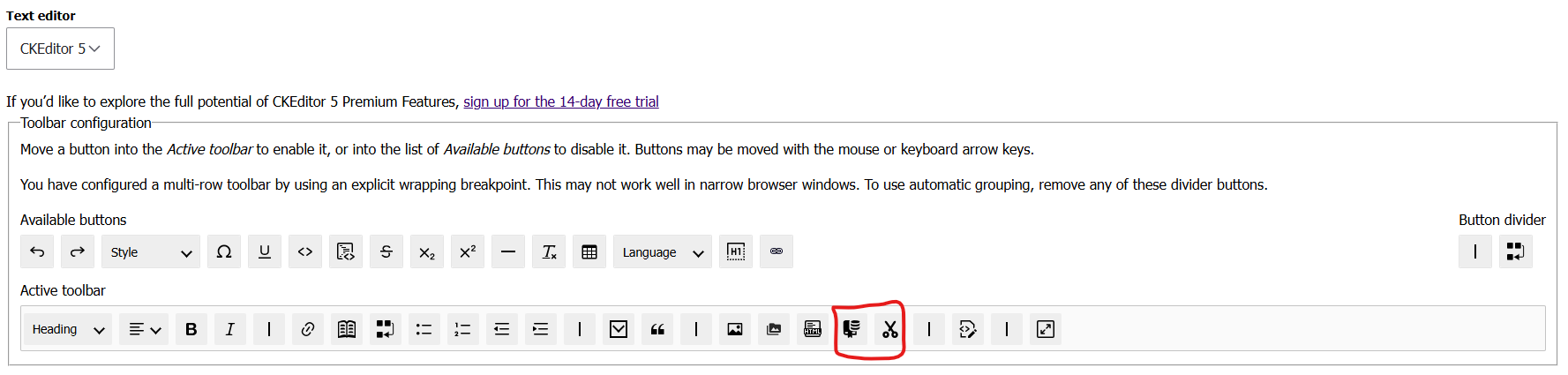
Below that, make sure the "Display embedded entities" filter is enabled and save it.
Content Editor Experience
This is where there is a little bit less than ideal of a user experience.
When a user presses the button you've added, the first screen of the form looks like this:
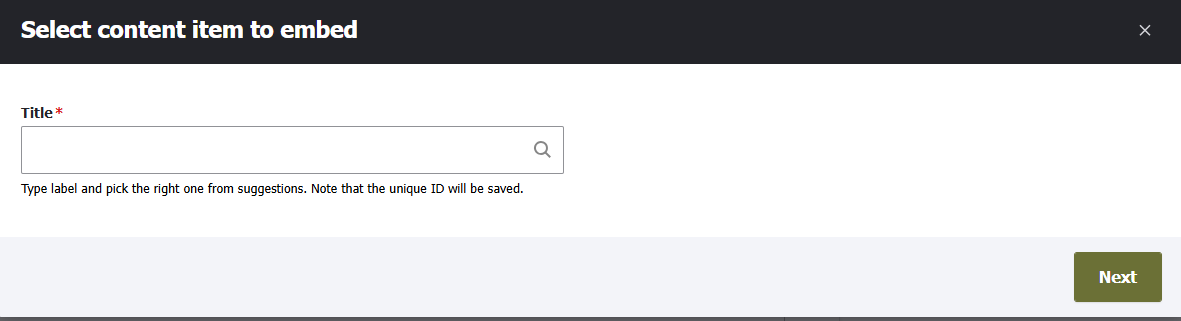
My minor gripes about the user experience here:
- Nothing indicates which specific embed content button they clicked on. If they accidentally click on the Reusable Content one instead of the Database one, there's nothing here to help them notice that mistake until they start searching and get confused why what they want isn't there. The pages are identical regardless of which button they click on, if you have more than one button.
- You can only search by the title of the entity you want. If there are two pages with the same title, you can't tell which one you're selecting - the only other indicator it gives you is the ID number and that usually means nothing to regular editors.
The next screen by default lets you pick alignment and caption. These options are there, even if you set up your button to not allow alignment or captions. That's definitely confusing to users.
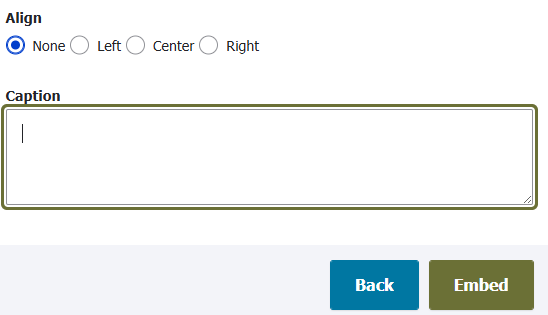
There is an issue logged for this and it has a patch that removes it. It's not incorporated into a release for some reason. If you apply the patch, it does as advertised, removing those options, but then it leaves the second page as nothing except a link to the entity that you just chose on the first page. It gives you no new information or settings, so it is just an extra button to press.
I wish they would collapse this into one screen with all the options, but only show the ones that are actually going to do anything.
Conclusion
Those small complaints about the user experience aside, this module does solve the problem very well.
In a future post, I will expand on this because it introduced another question for us: how do we make sure the editors know which other pages they are impacting by making an edit on a page that might be embedded elsewhere?
Previous: Drupal Meta Search Engine Headers
Next: Entity Usage Tracking