Series: Drupal Docker
tl;dr: Drupal offers a few types of phpunit regression testing suites, and those tests can also be run in CI/CD and in local development.
Series Description: This series details my development environment and CI/CD deployment pipeline. The first post in the series provides an overview and the code for the entire demonstration can be found in my GitLab. You can navigate other posts in the series using the list of links in the sidebar.
As with the previous couple posts in this series, this one is about testing. When you're maintaining a site over an extended period of time, something extremely useful is to have automated regression testing that will catch if you break one thing in the process of fixing another thing. This is regression testing, and with Drupal, that means phpunit.
I've also heard the suggestion that it is best to write the tests before you even write the live code. That way, as you work on the code, you can have the automated tests confirming what you have solved and what you haven't. I have not gotten very close to that point yet, and there are probably some scenarios where it isn't practical because I don't know the exact outcome I want until I start seeing it in practice. It does help demonstrate the real ideal, though, with constant verification that everything is still doing what it should before it gets merged and eventually sent to production.
Types of Tests in Drupal
In Drupal, there are four built-in test suites, in escalating complexity where the faster ones are also the least flexible:
- Unit tests: these are bare bones PHP. If the function I'm testing is very simple, this might be adequate and would be very fast.
- Kernel tests: this adds some core Drupal functionality, making it much easier to invoke services or install other modules, and still run almost as fast as plain unit tests.
- Functional tests: this adds the ability to walk through a workflow as a mock user and confirm certain behaviours. This is great for checking the end result, like testing that permissions are having the effect I expect, or that a view is displaying content the way I thought it would. They run much slower, but are appropriate in a lot of scenarios.
- Functional with JavaScript tests: this is similar to the above, but with JavaScript, so I want these when I need to confirm interactivity is still functioning as expected.
I have also installed Drupal Test Traits which is not included in core, but haven't gotten deep into understanding it yet.
Running Tests Locally
I already had an excellent general PHP extension installed called DEVSENSE.phptools-vscode.
The biggest complication is that the container is running as the root user, but it will need to use www-data to be able to run functional tests.
Running from the Command Line
I already had a postCreateCommand.sh script in my project that would run when starting up the VS Code developer environment, so it made the most sense to put it in the bashrc through that script:
# phpunit functional tests need to run as www-data
echo -e '\nphpunit() {\n    su -s /bin/bash -c "vendor/bin/phpunit $@" www-data\n}' >> /root/.bashrc
source /root/.bashrc
mkdir -p web/sites/simpletest && chmod 777 web/sites/simpletest
Integration with Tests Explorer
The extension does also support integration with the Tests Explorer of VS Code, but not without a bit of extra work. Some settings in the devcontainer.json will help the extension know what to run:
        "phpunit.phpunit": "/opt/drupal/vendor/bin/phpunit",
        "phpunit.command": "\"/opt/drupal/scripts/phpunit-wrapper.sh\" ${phpunitargs}",
The first of these is clear, pointing to the standard executable. The second one is telling it to use a wrapper script.
This tells the Tests Explorer to use that script instead of the default phpunit. That script looks like this, telling it to run the tests as www-data:
#!/usr/bin/env bash
set -euo pipefail

ROOT="/opt/drupal"
PHPUNIT="$ROOT/vendor/bin/phpunit"
PROJECT_TMP="$ROOT/.tmp"

# If the extension passes the phpunit binary as arg1, drop it.
if [[ "${1:-}" == "$PHPUNIT" ]]; then
  shift
fi

# Build args; ensure we add --configuration if not present, and prep coverage dir.
ARGS=()
HAVE_CONFIG=0
CLOVER_PATH=""
while [[ $# -gt 0 ]]; do
  case "$1" in
    --configuration|-c)
      HAVE_CONFIG=1
      ARGS+=("$1")
      shift
      [[ $# -gt 0 ]] && ARGS+=("$1")
      ;;
    --coverage-clover)
      shift
      CLOVER_PATH="${1:-}"
      if [[ -z "$CLOVER_PATH" ]]; then
        echo "ERROR: --coverage-clover requires a path" >&2
        exit 2
      fi
      CLOVER_DIR="$(dirname "$CLOVER_PATH")"
      mkdir -p "$CLOVER_DIR"
      chown -R www-data:www-data "$CLOVER_DIR"
      chmod -R u+rwX,g+rwX,o+rX "$CLOVER_DIR"
      ARGS+=(--coverage-clover "$CLOVER_PATH")
      ;;
    *)
      ARGS+=("$1")
      ;;
  esac
  shift || true
done

# If no --configuration provided, force the project one.
if [[ $HAVE_CONFIG -eq 0 ]]; then
  ARGS+=(--configuration "$ROOT/phpunit.xml")
fi

# Ensure a writable tmp dir and force PHP to use it.
mkdir -p "$PROJECT_TMP"
chmod 1777 "$PROJECT_TMP"

# Run as www-data, from the project root, with temp overrides.
exec su www-data -s /bin/bash -c \
  "cd '$ROOT' && TMPDIR='$PROJECT_TMP' TEMP='$PROJECT_TMP' TMP='$PROJECT_TMP' \
   exec '$PHPUNIT' -d sys_temp_dir='$PROJECT_TMP' $(printf "'%s' " "${ARGS[@]}")"
The next complication came with the phpunit.xml file. As is common for Drupal sites, I was using testsuite directory definitions like:
    <testsuite name="functional">
      <directory suffix="Test.php">web/modules/custom/**/tests/src/Functional</directory>
    </testsuite>
That approach has a major advantage that it will expand the ** and find all the tests from any modules or themes, without needing to specify every custom module or theme in the file. This works fine at runtime such as using a command line phpunit to run the tests. It does not work with the DEVSENSE module looking for tests statically. That requires each folder for tests be specified. Once each folder is specified, they will show up:
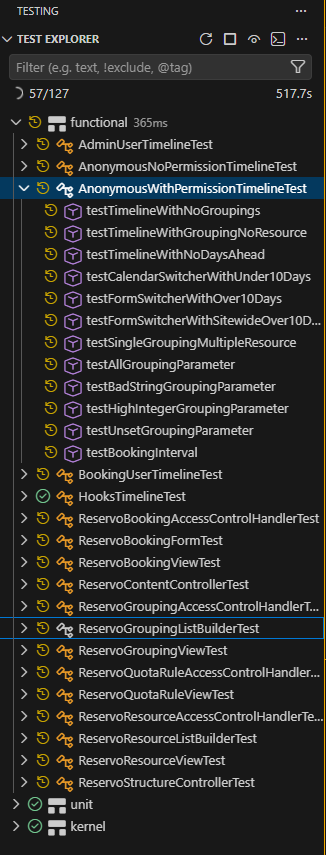
But I still didn't really want to have to remember to add each new custom module to the phpunit.xml file manually or risk not actually checking all my tests (until it got to CI/CD - see the next section). So, I added another bash script to automatically replace that section each time I attach to the container:
#!/usr/bin/env bash
# Rebuilds ONLY the generated region of <testsuites> in /opt/drupal/phpunit.xml
# so DEVSENSE (static) discovery can find Drupal tests without using ** globs.
# Safe to run repeatedly; only the lines between the BEGIN/END markers are changed.

set -euo pipefail

ROOT="/opt/drupal"
XML="$ROOT/phpunit.xml"
GEN="$ROOT/.tmp/phpunit-testsuites.generated.xml"

mkdir -p "$ROOT/.tmp"

# Suite name -> directory segment used under tests/src/<Segment>
declare -A MAP=(
  ["unit"]="Unit"
  ["kernel"]="Kernel"
  ["functional"]="Functional"
  ["functional-javascript"]="FunctionalJavascript"
  ["existing-site"]="ExistingSite"
  ["existing-site-javascript"]="ExistingSiteJavascript"
)

# Where to look for custom code that might contain tests.
# Add more roots here if needed (e.g., contrib).
SEARCH_ROOTS=(
  "$ROOT/web/modules/custom"
  "$ROOT/web/themes/custom"
)

# Build the generated suites content into $GEN.
# Merge results from all SEARCH_ROOTS and deduplicate.
{
  for suite in "${!MAP[@]}"; do
    seg="${MAP[$suite]}"
    echo "    <testsuite name=\"$suite\">"

    # Gather directories from all roots, handle missing roots gracefully
    tmpfile="$(mktemp)"
    for r in "${SEARCH_ROOTS[@]}"; do
      if [[ -d "$r" ]]; then
        # Find dirs like */tests/src/<Segment>
        # -print0 | xargs -0 ensures we handle spaces safely when we sort/uniq later.
        find "$r" -type d -path "*/tests/src/$seg" -print
      fi
    done | sort -u > "$tmpfile"

    # Emit <directory> entries (relative to workspace root)
    while IFS= read -r dir; do
      [[ -z "$dir" ]] && continue
      rel="${dir#$ROOT/}"
      printf '      <directory suffix="Test.php">%s</directory>\n' "$rel"
    done < "$tmpfile"
    rm -f "$tmpfile"

    echo "    </testsuite>"
  done
} > "$GEN"

# If nothing was found at all, keep suites present but empty (prevents parser issues).
if [[ ! -s "$GEN" ]]; then
  {
    echo '    <testsuite name="unit"/>'
    echo '    <testsuite name="kernel"/>'
    echo '    <testsuite name="functional"/>'
    echo '    <testsuite name="functional-javascript"/>'
    echo '    <testsuite name="existing-site"/>'
    echo '    <testsuite name="existing-site-javascript"/>'
  } > "$GEN"
fi

# Replace ONLY the region between markers in phpunit.xml.
TMP="${XML}.tmp.$$"
awk -v genfile="$GEN" '
  BEGIN { in_gen = 0 }
  /<!-- BEGIN GENERATED \(do not edit\) -->/ {
    print;                      # keep BEGIN marker
    while ((getline line < genfile) > 0) print line
    close(genfile)
    in_gen = 1
    next
  }
  /<!-- END GENERATED \(do not edit\) -->/ {
    print;                      # keep END marker
    in_gen = 0
    next
  }
  in_gen == 1 { next }          # skip old generated content
  { print }                     # print everything else unchanged
' "$XML" > "$TMP"

mv "$TMP" "$XML"
echo "phpunit.xml testsuites successfully regenerated."
That section of the phpunit.xml file, before this script has run and found any tests, looks like this:
  <testsuites>
    <!-- BEGIN GENERATED (do not edit) -->
    <!-- END GENERATED (do not edit) -->
  </testsuites>
Finally, the functionality is fully working including total integration with Tests Explorer, with a minor caveat that it won't immediately pick up a new test while I am writing it; that won't happen until the next time I attach or run the script manually.
Running Tests in CI/CD
What if I forget to run the tests before making a commit, though? Running all the tests in certain conditions upon committing or merging to my repository is the best way to be sure that I don't push through a regression. To do that, I need an image that can run the tests, and the GitLab CI file to define in what circumstances to run that job.
phpunit_test:
  stage: test
  image: $CI_REGISTRY_IMAGE/web:$CI_COMMIT_REF_SLUG
  before_script:
    - apache2ctl start
    - /opt/drupal/scripts/phpunit-xml-file.sh
  script:
    - cd /opt/drupal
    - mkdir -p /opt/drupal/web/sites/simpletest/browser_output
    - /opt/drupal/vendor/bin/phpunit --coverage-html $CI_PROJECT_DIR/coverage  > phpunit_errors.txt
  artifacts:
    when: always
    paths:
      - coverage/*
      - phpunit_errors.txt
    expire_in: 5 months
  rules:
    - if: '$CI_PIPELINE_SOURCE == "merge_request_event"'
      when: never
    - if: "$CI_COMMIT_BRANCH =~ /^202/ || $CI_COMMIT_BRANCH =~ /^(dev|staging)$/"
This uses the fully built image, which is necessary to have the phpunit executable added from composer. It keeps an artifact of the reports of errors and coverage for 5 months (because typically I'm doing major updates every 4 months).
Most of note is the rules section. In theory, I would love to run these tests on every commit. That isn't feasible, though, as the functional tests can take an extremely long time to run. Even when I took out the part providing a coverage report, it still took over an hour to run tests on a project that doesn't even have close to full coverage yet. Requiring them to pass before every merge to a release branch (the ones starting with 202) would mean that I would basically only be able to do one or two merges per day with long waits before getting started on the next issue branch. That's a lot of time lost when the changes are a lot smaller. Instead, I decided to strike a middle ground: I would run them after merges into the release branch as well as dev and staging, to make sure that if there are any issues I will have time to come back and fix them well before it gets to production, but I'm not being held up on starting my next issue while waiting for the tests to pass.
Previous: cDox
Next: Email: Proton